How to Install Wifi Smart Switch for Home Automation?
In the realm of home automation, the Wifi Smart Switch stands out as a crucial component. According to Emily Carter, a leading expert in smart home technology, "The Wifi Smart Switch transforms any ordinary light into a smart device." This innovation allows homeowners to control lighting effortlessly from their smartphones.
Installing a Wifi Smart Switch may appear straightforward, but it often brings unexpected challenges. For instance, many homeowners struggle with understanding their existing wiring. Some may need assistance from professionals, especially when dealing with older homes. It's essential that users follow the installation manual closely.
Moreover, optimizing the Wifi Smart Switch’s performance requires careful network setup. A weak Wi-Fi signal can lead to connectivity issues. Not addressing this can result in frustration. It’s vital for users to check their router placement and signal strength before installation. Awareness of these factors can prevent potential pitfalls and enhance overall user experience.
Understanding Wifi Smart Switches and Their Benefits
Wifi smart switches offer a modern solution for home automation. They allow users to control lighting and appliances remotely. This convenience can enhance daily routines significantly.
Picture arriving home, and with a simple tap on your phone, the lights turn on. It creates a welcoming ambiance.
Efficiency is another major benefit. Smart switches can reduce energy consumption. They can be programmed to turn off lights when they are not needed. However, some users might struggle with installation or connectivity issues.
Not every switch is compatible with all systems, leading to frustration. It's crucial to do thorough research beforehand.
Security is also a notable benefit. Smart switches can help identify unusual activity in your home. Being able to control your lights from anywhere adds peace of mind.
Nonetheless, some people may find themselves overly reliant on technology. Balancing convenience with good old-fashioned manual control can be a healthy practice.
Choosing the Right Wifi Smart Switch for Your Needs
Choosing the right WiFi smart switch is crucial for effective home automation. The global smart switch market is projected to reach $12.81 billion by 2026. With numerous options available, it can be daunting to select the right one. Start by assessing your home’s needs. How many devices will you control? WiFi switches can often handle multiple devices. This can save you money and space.
Compatibility is another key factor. Not all smart switches work with every home system. Research compatibility with your existing setup. Some models may only function with specific types of routers. Data from a recent report indicates that 30% of users face connectivity issues due to this incompatibility. Choosing a switch with a broad range of compatibility can prevent future headaches.
Another aspect to consider is ease of installation. Many users report difficulty in setting up complex devices. Look for models with straightforward instructions and user-friendly apps. A survey revealed that 40% of users experienced challenges during installation. Simplicity in setup can greatly enhance your experience. Remember, the goal is to simplify your life, not complicate it further.
How to Install Wifi Smart Switch for Home Automation? - Choosing the Right Wifi Smart Switch for Your Needs
| Feature | Description | Example Use Case |
| Compatibility | Check if the switch works with your existing smart home system (e.g. Alexa, Google Home). | A smart switch compatible with Google Home for voice control. |
| Load Capacity | Ensure the switch can handle the wattage of the devices you plan to control. | Controlling light fixtures that require 1000 watts. |
| Installation Process | Determine if the installation requires a neutral wire or not; follow wiring instructions carefully. | Installing in a location without a neutral wire, requiring more research. |
| Mobile App Availability | Check if there is an app for remote control and settings adjustments. | Using the app to create schedules for lights. |
| Customer Reviews | Read reviews to gauge performance and reliability. | Finding a switch with high ratings for reliability and ease of use. |
Step-by-Step Guide to Installing a Wifi Smart Switch
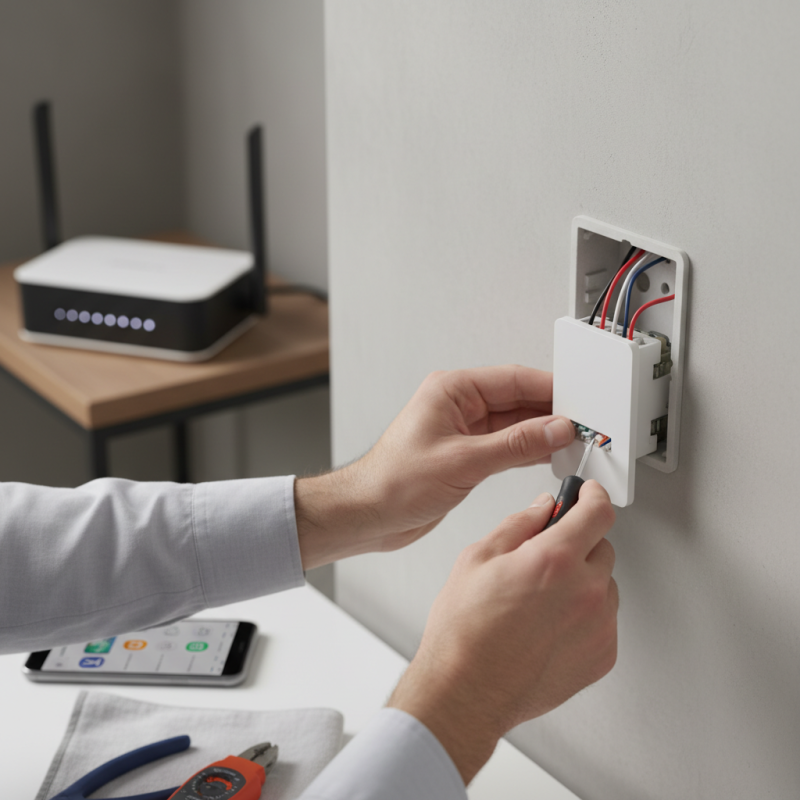
Installing a WiFi smart switch is an excellent step toward home automation. This guide will walk you through the installation process in simple steps. Begin by gathering all necessary tools: a screwdriver, wire strippers, and electrical tape. Make sure to turn off the power at the circuit breaker before starting.
Next, remove the existing switch from the wall carefully. Note where the wires connect to the old switch. This is crucial for the new switch installation. Strip the ends of the wires if needed. Connect the wires to the corresponding terminals on the smart switch. You might find it challenging to match the colors, but take your time. Tighten the connections securely and make sure they are not loose.
Finally, tuck the wires back into the wall box and attach the smart switch to the wall. Turn the power back on at the breaker. Test the switch to ensure it works properly. Occasionally, it may require troubleshooting. If it doesn't connect to your WiFi, check your network settings. Don't hesitate to refer back to the instructions. Remember, every installation may not go perfectly. Reflecting on what went wrong is part of the learning process. Enjoy your new smart switch!
Smart Switch Power Consumption by Room
Configuring the Smart Switch with Your Home Network
Configuring the smart switch with your home network can seem daunting, but it’s quite manageable. Begin by connecting the switch to a power source. Make sure your smartphone is nearby and has the relevant app installed. Follow the prompts in the app to add a new device. This usually involves connecting to the switch’s temporary Wi-Fi signal.
Once you establish that connection, your app will ask for your home Wi-Fi network details. Enter your Wi-Fi password carefully. If you make a mistake, it can delay the process. After inputting the credentials, the switch will attempt to link to your network. Ensure your router is nearby for a stronger signal.
Tips: Be patient if the configuration fails. Sometimes, a simple reset of the switch can resolve the issue. If the app is unresponsive, closing and reopening it can help. If all else fails, checking the user manual may provide specific troubleshooting tips. Remember, not every attempt will be successful right away. Take breaks and revisit the setup if needed.
Testing and Troubleshooting Your Installed Smart Switch
After installing your WiFi smart switch, testing is crucial. Begin by ensuring that the switch connects properly to your home network. According to recent reports, up to 30% of smart home devices fail during initial setup due to connectivity issues. Check the Wi-Fi signal strength at the switch's location. Weak signals can cause intermittent issues. A simple test involves turning the switch on and off via its app. If there’s a delay or failure, consider relocating your router or using a Wi-Fi extender.
Troubleshooting can be a common necessity. If the switch isn’t responding, reset it according to the instructions. Many users forget to do this and face frustrations. Power cycling the switch might also help for devices that seem unresponsive. Reports indicate that nearly 25% of smart device complaints stem from improper resets. Always ensure your firmware is updated. Check the manufacturer's website for any updates. Outdated software often leads to bugs and poor performance. Addressing these small issues early can save time and enhance functionality.