
How to Choose a Traffic VMS LED Display?

Choosing a traffic VMS LED display is not simply a matter of selecting the brightest screen or the largest available size. The display must make changing messages clear to drivers, often within a brief viewing window. Consider viewing distance, road speed, ambient light, and the amount of information shown on each message. A sign beside a sunlit highway has different needs from one on a slower urban road. Small details matter. Pixel pitch affects legibility, while brightness controls and automatic dimming help maintain visibility as light conditions change.

A practical evaluation should also cover the cabinet’s weather resistance, operating temperature range, power use, and communication options. Ask suppliers for readable-message examples at realistic distances, not only close-up product photos. Check how the display handles faults, how components can be serviced, and whether replacement parts are available. These questions reveal more than a headline specification. That is not enough. A high-resolution screen may still be a poor fit if its messages are difficult to read quickly or its maintenance needs exceed the available support. Compare products against the actual road environment and operating plan, and document why each requirement matters. Specifications can look precise, but real-world visibility depends on several conditions working together. This guide explains the key factors to weigh, the trade-offs to question, and the practical checks that can help buyers choose a dependable traffic VMS LED display.
How to Choose a Traffic VMS LED Display?

Understanding Traffic VMS LED Displays and Their Applications

How to Choose a Traffic VMS LED Display?

Understanding Traffic VMS LED Displays and Their Applications

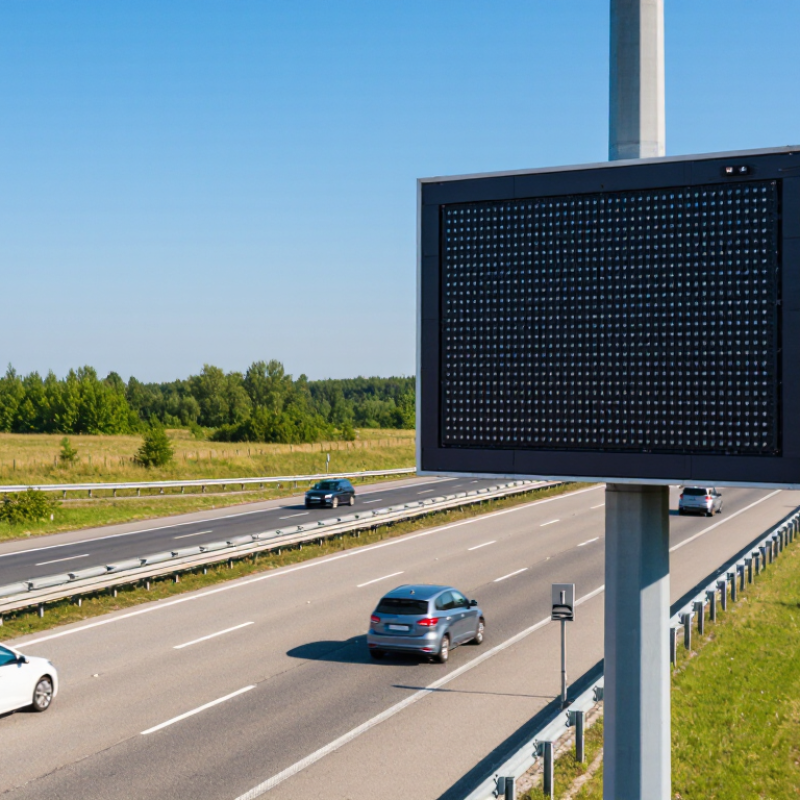
A traffic VMS LED display is a roadside sign that presents changeable messages, symbols, or lane guidance. Unlike a fixed sign, it can respond to changing conditions, such as a queue, roadworks, or a temporary lane closure. Drivers often have only a few seconds to read it. Keep messages brief.

These displays serve motorways, tunnels, urban routes, and approaches to bridges or event areas. The right unit depends on where drivers see it, how fast they travel, and what information must appear. Check viewing distance and character height together; a technically sharp image may still be hard to read from a moving vehicle.

Pixel pitch matters, but it is not the whole story. Ambient-light sensors and suitable brightness help maintain contrast from midday sun to night without creating glare. Weather-resistant construction, readable colors, and dependable remote controls also deserve attention. Ask how the display performs in rain, cold, and direct sunlight, not only in a showroom.

There is a trade-off: a larger cabinet can improve legibility, but it may complicate mounting and maintenance.

Confirm power, communications, and access to replaceable modules before purchase. Have operators review sample messages at realistic road distances. A small test can reveal awkward abbreviations or poor contrast.

These details are easy to miss.

Defining Roadway, Message, and Viewing Requirements

How to Choose a Traffic VMS LED Display?

Defining Roadway, Message, and Viewing Requirements

Start with the road, not the screen. Record operating speeds, lane count, sign offset, approach curves, and typical weather. A driver approaching at highway speed has less time to read than one nearing an urban intersection. FHWA’s 11th Edition MUTCD recommends limiting dynamic message signs to two phases. Treat that as a practical ceiling, not a target: one clear message is often easier to absorb.

Distance matters. Estimate the point where drivers first need the information, then check that the display remains legible through the full approach. Letter height, pixel pitch, and viewing angle affect readability; a fine-pitch panel may look sharp up close but add cost without helping distant drivers. Test the proposed layout from a vehicle, in daylight and after dark. Glare can erase contrast. So can rain.

Build messages around decisions: lane closure, travel time, or a detour. Keep wording brief and avoid squeezing extra lines onto the display. FHWA’s Manual on Uniform Traffic Control Devices emphasizes concise, readable messages and adequate display time. Useful guidance, but field conditions are messy. A sign may meet a specification and still be hard to read beside headlights or roadside clutter. Check sightlines, ambient light, and message comprehension at the actual installation location before fixing brightness and character size.

Selecting Display Size, Pixel Pitch, and Brightness

How to Choose a Traffic VMS LED Display?

Selecting display size, pixel pitch, and brightness starts with the road. Estimate the farthest viewing distance, vehicle speed, and available installation space. FHWA’s 11th Edition MUTCD gives minimum letter heights of 18 inches for freeways and 12 inches for other roads. Use these figures as a baseline, then check that drivers can read the message within their approach time. A larger cabinet is not automatically clearer; cramped layouts can make short messages harder to scan.

Pixel pitch affects how sharply text and symbols appear. Smaller pitch can improve close-range detail, but it often adds cost without helping distant drivers. Match pitch to viewing distance and test actual characters at night and in daylight. Brightness must handle direct sun without glaring after dark. Specify automatic dimming tied to ambient light, and verify performance from the driver’s lane—not just beside the sign. Conditions vary, and a setting that looks right in a workshop may disappoint outdoors.

Tips: Measure sightlines before ordering. Test full-size messages on site. Readability comes first. Keep a record of brightness settings, then review them after installation.

Evaluating Weather Resistance, Power, and Control Systems

How to Choose a Traffic VMS LED Display?

Weather resistance is more than a sealed cabinet. IEC 60529 defines IP66 as dust-tight, with protection against powerful water jets. That rating is a useful baseline for roadside exposure, not proof against every failure. Check the display’s operating-temperature range, UV resistance, drainage, and corrosion protection against local climate records. ASHRAE climate design data can help identify temperature extremes for the installation site. A detail worth questioning: a high IP rating may still leave connectors or service panels vulnerable if installation is careless.

Power figures need context. Ask for measured consumption at full brightness, typical nighttime brightness, and standby—not just a peak-wattage figure. Ambient-light sensors can lower output after dark, but poor calibration may make messages hard to read. For control, check support for NTCIP, the National Transportation Communications for ITS Protocol, and confirm that operators can monitor faults remotely. FHWA guidance on dynamic message signs emphasizes clear, legible messages; reliable communications matter when content must change quickly. I would test the whole chain: controller, network connection, and sign response. It is easy to overlook the network until a field connection drops.

How to Choose a Traffic VMS LED Display? — Evaluating Weather Resistance, Power, and Control Systems

Evaluation Area Practical Selection Target What to Check Why It Matters
Ingress protection Look for an enclosure rating appropriate for outdoor exposure; IP65 or better is a common target for protection against dust and water jets. Confirm the rating applies to the complete assembled display, including doors, vents, cable entries, and service panels. Check whether front and rear sections have separate ratings. Dust and water intrusion can damage electronics and shorten service life. IP ratings are defined by IEC 60529.
Operating temperature Specify a rated operating range that covers the site's recorded seasonal extremes. Outdoor equipment commonly uses ranges around −30°C to +60°C, but the required range is site-dependent. Review the manufacturer's rated range, thermal management method, and any output or brightness limitations at temperature extremes. Temperature affects component life, display performance, and whether heating or ventilation is needed.
Wind and structural loading Require structural design for the project's local wind loads and applicable building or roadway authority requirements. Verify calculations for the display, cabinet, support structure, anchors, and foundation. Do not rely on a generic wind-speed figure in place of site-specific engineering. The display and mounting system must safely withstand local exposure, including gusts and the effects of the installation location.
Corrosion resistance Choose materials and protective finishes suited to the environment, especially for coastal, humid, or road-salt-exposed sites. Check cabinet material, coating system, fasteners, seals, and any stated corrosion-test results or maintenance requirements. Corrosion can weaken fixings and damage electrical connections even when the enclosure is weather-resistant.
Brightness and dimming For daylight visibility, compare models with suitable outdoor brightness; some traffic displays are specified in the approximate range of 5,000–10,000 cd/m². Check measured brightness, viewing angle, uniformity, and automatic dimming using ambient-light sensors. Confirm nighttime settings can avoid excessive glare. Brightness needs vary with sunlight, viewing distance, sign size, and local requirements. Automatic dimming helps balance legibility and nighttime comfort.
Pixel pitch and legibility Select pixel pitch and character sizing based on the required message, viewing distance, road speed, and applicable traffic-sign guidance. Review representative messages at the intended viewing distance and angle. Ask for a legibility assessment rather than choosing pitch on its own. Smaller pitch can improve detail, but legibility also depends on character size, contrast, viewing conditions, and message design.
Power supply Confirm compatibility with the site's available supply, commonly 120 V or 230 V AC depending on the region and installation. Obtain rated voltage, frequency, maximum and typical consumption, startup current, power factor, and circuit-protection requirements. Electrical planning should use the actual display configuration and operating profile, not a generic estimate.
Energy consumption Request power data for maximum-brightness operation and representative message and dimming conditions. Compare consumption for the same display size and operating assumptions. Check whether the stated figure includes controllers, heaters, fans, or other auxiliaries. LED output and environmental equipment can cause power demand to vary substantially between models and operating conditions.
Surge and electrical protection Specify grounding, overcurrent protection, and surge protection consistent with local electrical codes and the installation design. Check protection for incoming power and communication lines, bonding provisions, and procedures for inspection or replacement. Outdoor roadside installations may be exposed to electrical transients. Protection needs should be established by the project electrical design.
Control-system compatibility Where required by the traffic agency, select a controller supporting the applicable NTCIP 1203 requirements for dynamic message signs. Verify the exact protocol version, supported features, agency system compatibility, and any interoperability testing requirements. Protocol support can simplify integration, but compatibility depends on the implemented features and the agency's configuration.
Communications Choose wired Ethernet, fiber, cellular, or another approved link based on distance, site infrastructure, and agency network policy. Check connection availability, bandwidth, latency, backup options, remote diagnostics, and network-security requirements. Reliable communications support timely message updates and monitoring; the best link depends on the site.
Access control and cybersecurity Require role-based user access and secure management practices appropriate to the owner's operational network. Ask about authentication, encrypted remote access, audit logs, software updates, account management, and security responsibilities. Traffic messages are operationally important, so access should be limited to authorized personnel and managed throughout the system's service life.
Monitoring and maintenance Prefer remote status reporting for faults, temperature, communications, and power where supported by the system. Review alarm details, diagnostic access, spare-parts availability, service access, and recommended inspection intervals. Clear diagnostics can help maintenance teams identify issues and reduce unnecessary site visits.

Note: Values shown are selection guidance, not universal specifications. Confirm final requirements with the road authority, site engineering, local codes, and the display's verified product documentation.

Checking Standards, Installation, and Long-Term Maintenance

A traffic VMS LED display should be judged against recognized requirements, not brightness alone. Check the project specification against the current MUTCD and applicable NEMA dynamic-message-sign standards. Confirm pixel pitch, character height, viewing distance, luminance control, and cabinet protection suit the road speed and local weather. FHWA’s 2023 MUTCD provides guidance on changeable-message sign design and legibility; use it when reviewing message layout and placement. Test a sample message from a driver’s approach, including under glare and rain. The site may expose flaws that drawings miss.

Installation quality shapes years of service. Inspect foundations, drainage, grounding, surge protection, cable routing, and access for maintenance before commissioning. Record baseline power draw, display uniformity, and temperature readings. The U.S. Department of Energy’s 2019 solid-state lighting forecast projected 569 terawatt-hours of annual U.S. energy savings by 2035 across general illumination; that is not a VMS-specific estimate, but it underscores why efficiency and thermal design deserve attention. Heat can shorten component life. It is easy to overlook.

Plan maintenance around real operating conditions. Schedule periodic checks for dead pixels, dim modules, loose seals, fan or filter buildup, and corrupted message files. Keep spare modules and a clear fault log, but verify replacements match the original optical and electrical specifications. A maintenance plan should define response times and safe access procedures. Still, no checklist predicts every failure. Review service records each season and adjust inspection intervals when dust, salt, or temperature swings prove harsher than expected.

Suggested VMS LED Display Inspection Plan

Example planning intervals for routine upkeep. Actual inspection schedules should follow applicable traffic-control requirements, site conditions, and the display manufacturer’s guidance.